Saturday, 28 April 2012

TO MOVE A RESOURCE FROM ONE LPAR TO ANOTHER LPAR

TO MOVE A RESOURCE FROM ONE LPAR TO ANOTHER LPAR

Select lpar on which you have to to do DLPAR operation
 select tasks or (the arrow besides the lpar)
Select dynamic logical partitioning > resource to move(for example here processor) select move

In the coming window select destination partition (the partition to which we want to move resources)


Select the amount of resource to move

 PUT THE AMOUNT OF RESOURCES TO BE MOVED AND SELECT THE DESTINATION PARTITION


TO MOVE MEMORY RESOURCES

select tasks or (the arrow besides the lpar)
Select dynamic logical partitioning > resource to move(for example here memory ) select move
As in the screen above
Now you will be presented the screen below
Write the amount of memory resource to move
Select Destination Lpar and click on ok


TO MOVE I/O RESOURCES


Select the adapter (there are no removable adapter in the screen shot below )

By clicking ok after selecting the adapter you will remove the adapter from the lpar selected

select destination lpar from the option to move the adapter to the destination LPAR


select tasks or (the arrow besides the lpar)
Select dynamic logical partitioning > resource to move(for example here adapter ) select move
As in the screen above


* Source Article from : Internet
HOW TO CONFIGURE ISCSI CLIENT ON AIX

HOW TO CONFIGURE ISCSI CLIENT ON AIX


VERIFICATION OF DISK

This screen shot shows the output of lspv when we dont have any iscsi disk on the server


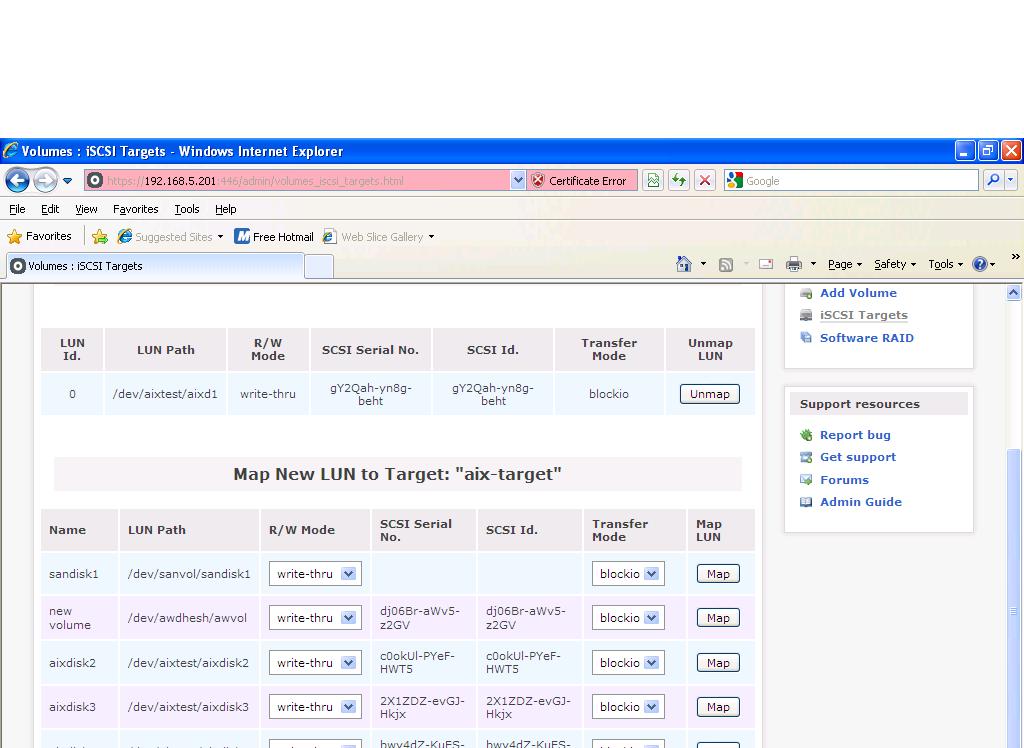
The screen show above shows that how a disk is mapped to a target

Now configure the target on aix server

Go to /etc/iscsi directory

and provide the target configuration  In this example 192.168.5.202 is the storage and aix-target is the target

# cd /etc/iscsi
# ls
autosecrets  targets      targetshw
# tail -6 targets
# The target line would look like:
# 10.2.1.106 3260 iqn.2003-01.com.ibm:00.fcd0ab21.shark128 \
#               "123ismysecretpassword.fc1b"
#
192.168.5.202 3260 aix-target
#

Now at the Aix server add the ip and change iscsi0 adapter configuration

Added ip as alias to connect to storage

Checked the connectivity
and changed iscsi0 adapter configuration
Run cfgmgr after that


# chdev -l en0 -a alias4=192.168.5.200 -a netmask=255.255.255.0

en0 changed

# ping -c 2 192.168.5.202
PING 192.168.5.202: (192.168.5.202): 56 data bytes
64 bytes from 192.168.5.202: icmp_seq=0 ttl=64 time=0 ms
64 bytes from 192.168.5.202: icmp_seq=1 ttl=64 time=0 ms
----192.168.5.202 PING Statistics----
2 packets transmitted, 2 packets received, 0% packet loss
round-trip min/avg/max = 0/0/0 ms
# chdev -l iscsi0 -a initiator_name=aix-target
iscsi0 changed
# lspv
hdisk0          00c402db281a05c4                    None
hdisk1          00c402db1717210e                    rootvg          active
# cfgmgr


Now you can see a new disk from storage

# cfgmgr
# lspv
hdisk2          00c402db175641a3                    None
hdisk0          00c402db281a05c4                    None
hdisk1          00c402db1717210e                    rootvg          active
# lsattr -El hdisk2
clr_q         no                               Device CLEARS its Queue on error True
host_addr     192.168.5.201                    Hostname or IP Address           False
location                                       Location Label                   True
lun_id        0x0                              Logical Unit Number ID           False
max_transfer  0x40000                          Maximum TRANSFER Size            True
port_num      0xcbc                            PORT Number                      False
pvid          00c402db175641a30000000000000000 Physical volume identifier       False
q_err         yes                              Use QERR bit                     True
q_type        simple                           Queuing TYPE                     True
queue_depth   1                                Queue DEPTH                      True
reassign_to   120                              REASSIGN time out value          True
rw_timeout    30                               READ/WRITE time out value        True
start_timeout 60                               START unit time out value        True
target_name   aix-target                       Target NAME                      False
#

* Source Article from : Internet

CREATING FILE SYSTEM ON DISK PROVIDED FROM VIO

CREATING FILE SYSTEM ON DISK PROVIDED FROM VIO

THIS DOCUMENT WILL GIVE YOU STEP BY STEP TO PROVIDE  DISK TO LPAR USING VIRTUAL SCSI IN A MPIO ENV FOR MORE DETAILS VISIT http://aix-administration.blogspot.com/2011/01/in-depth-of-disk-assignment-from-vio-to.html

As a administrator we need to go into concepts of activities performed by us , i am assuming that the reader does not knows much about the vio server and client and will start from the scratch ,
  
AT THE CLIENT SIDE  GET THE LPAR NAME AND LPAR ID

If we know lpar id we can identify this lpat on hmc and vio server side


#uname -L


NOW WE WILL PERFORM OPERATION ON THE LPAR WHICH WE GOT FROM THE ABOVE COMMAND

But how do we know which managed system to go its quiet simple run command uname -a and it will give you the serial number , most of the times managed system name has serial number in their names
If you still cannot come to a answer iew my post http://aix-administration.blogspot.com/2011/01/in-depth-of-disk-assignment-from-vio-to.html

IN HMC OPEN THE MANAGE SYSTEM


CHECK PROPERTIES OF LPAR 


SELECT THE LPAR AND SELECT PROPERTES FROM TASKS OPTION
THE CLIENT ADAPTER ID AND RELATIVE SERVER ADAPTER AND THE VIO SERVER PROVIDING THAT SERVER ADAPTER IS SHOWN IN THE PROPERTIES AS IN FIGURE FOR EXAMPLE CLIENT ADAPTER ID 4 IS CONNECTED TO SCSI ADAPTER WHONE ID IS 81 AND THE VIO SERVER WHO IS PROVIDING THE SERVER ADAPTER IS MENTIONED
IF YOU SEE RUN lscfg -vl <adapter name> YOW WILL GET CLIENT ADAPTER ID 


NOW GO TO THE VIO PARTITION WHICH IS SHOWN IN THE ABOVE FIGURE AND SEE ITS VIRTUAL ADAPTERS BY GOING IN THE PROPERTIES OF THE VIO SERVER


THE ABOVE FIGURE SHOWS THAT THE SERVER ADAPTER WITH ID 81 IS PROVIDING ITS RESOURCES TO CLIENT ADAPTER WITH ID 4


NOW LOG ON TO VIO SERVER AND
SEE ALL DISKS AVAILABLE


BY USING

lsdev -type disk

OR

VERIFY THEDISK AVAILABLE ON VIO SERVER
#lsdev |grep hdisk


* Source Article from : Internet


CHECK THE VHOST ADAPTER ASSOCIATED WITH THE LPAR ID
WE CAN ALSO USE COMMAND

lsmap -all |grep vhosts

THE LAST COLOUMN OF THE ABOBE COMMAND WILL SHOW THE LPAR ID


ASSIGN DISK TO VHOST ADAPTER
#mkvdev –vadapter  vhost23 –vdev hdisk113 –dev eebackupvgpv


ON CLIENT LPAR CHECK FOR NEW DISK AND PATHS FROM THE WHICH THE DISK IS COMING


ASSIGN THE DISK  FROM OTHER VIO ALSO


CHECK FOR DISK ATTRIBUTES ON VIO SERVERS


NOW THE FILE SYSTEM ON CLIENT CAN BE CREATED


CHECK FOR THE DUAL PATH PROVIDED FROM OTHER VIO ALSO


* Source Article from : Internet

IN DEPTH OF DISK ASSIGNMENT FROM VIO TO LPAR


IN DEPTH OF DISK ASSIGNMENT FROM VIO TO LPAR 


STEP BY STEP DOCUMENT TO ASSIGN DISK

Get “Lpar id” very useful in detecting lpar on managed system

root@reports[/]-> uname -L

17 reporting

Get serial number helpful in detecting in which managed system lpar resides

root@reports[/]-> uname -a

AIX reports 1 6 00C5FE554C00

Check all the pv present on lpar

root@reports[/]-> lspv

hdisk0          00c5fe55cfd2b2a5    rootvg          active

hdisk1          00c5fe55cfd2b31d    swapvg          active

hdisk2          00c5fe55cfd2b394    swapvg          active

*

*
hdisk22         00c5fe55cfd2c441 suptoolsvg      active

hdisk23         00c5fe55c57a7348  altinst_rootvg


GETTING INFORMATON ON VIO

Get all the pv present on the vio

padmin@and001vio[/home/padmin]-> lspv                                          

NAME          PVID               VG               STATUS  

hdisk0      00c5fe5572e3b206  rootvg           active  

hdisk1      00c5fe5520c5f6a3  rootvg           active  

hdisk2      00c5fe65af1240bc   None                     

hdisk3     00c5fe55cff110f1    None                     

hdisk4     00c5fe55cff111b6    None                     

hdisk5     00c5fe55cff11276    None                     

hdisk6    00c5fe55cff1133d     None   

*

*                 

hdisk113         none           None                      

hdisk114         none          None                     

Detect New Device

padmin@and001vio[/home/padmin]-> cfgdev                                        


Some error messages may contain invalid information                            

for the Virtual I/O Server environment.                                        


cfgmgr: 0514-621 WARNING: The following device packages are required for       

        device support but are not currently installed.                        

devices.fcp.array      


Now again check the New disk        


padmin@and001vio[/home/padmin]-> lsdev -type disk|grep hdisk                   

hdisk0     Available   SAS Disk                            

hdisk1     Available   SAS Disk                               

hdisk2     Available   SAS Disk                      

hdisk3    Available   MPIO 2810 XIV                         

hdisk4    Available   MPIO 2810 XIV                  

hdisk112  Available   MPIO 2810 XIV                             

*
*

hdisk113         Available   MPIO 2810 XIV Disk                                

hdisk114         Available   MPIO 2810 XIV Disk         


Check that Whether the disk is provided to any other vhost or not                       

padmin@and001vio[/home/padmin]-> lsmap -all -field backing|grep hdisk113       

Backing device       hdisk113                                                  

padmin@and001vio[/home/padmin]-> lsmap -all -field backing|grep hdisk114   

or run command lspv -free

Check the vhost related to lpar   

As these vhosts are related with lpar id 11(hex) , 17(decimal) , this means these vhosts are provided to lpar id 17 (we saw the lpar id at lpar by typing uname –L)


padmin@and001vio[/home/padmin]-> lsmap -all -field svsa clientid               

SVSA             Client Partition ID                                           

---------------  -------------------                                           

vhost18          0x00000010                                                     
                                                                               

SVSA             Client Partition ID                                           

---------------  -------------------                                            

vhost19          0x00000011                                                    
                                                                               

SVSA             Client Partition ID                                            

---------------  -------------------                                           

vhost20          0x00000011                                                    
                                                                                

SVSA             Client Partition ID                                           

---------------  -------------------                                           

vhost21          0x00000011                                                     
                                                                              

SVSA             Client Partition ID                                           

---------------  -------------------                                            

vhost22          0x00000011                                                    
                                                                             

SVSA             Client Partition ID                                           

---------------  -------------------                                           

vhost23          0x00000003                                                    


Check details of the vhost adapters associated with the lpar 


padmin@and001vio[/home/padmin]-> for x in vhost19 vhost20 vhost21 vhost22      

> do                                                        

> lsmap -vapter $x                                         
> done                                                     

SVSA            Physloc             Client Partition ID

--------------- -------------------------------------------- ------------------
vhost19         U8204.E8A.105FE55-V1-C71     0x00000011        

VTD   
repbi01_1                                                

Status                Available                                                

LUN                   0x8500000000000000                                       

Backing device        hdisk72                                                  

Physloc               U78A0.001.DNWHL4W-P1-C2-T1-W50017380053D0140-L460000000000
                                                                               

VTD                   repbi02_1                                                           

Status                Available                                                

LUN                   0x8600000000000000                                       

Backing device        hdisk73                                                  

Physloc               U78A0.001.DNWHL4W-P1-C2-T1-W50017380053D0140-L470000000000
                                                                                

VTD                   repptmp_1                                                

Status                Available                                                

LUN                   0x8400000000000000                                       

Backing device        hdisk71                                                  

Physloc               U78A0.001.DNWHL4W-P1-C2-T1-W50017380053D0140-L450000000000
                                                                               

VTD                   reprootvg_1                                              

Status                Available                                                

LUN                   0x8100000000000000                                       

Backing device        hdisk13                                                  

Physloc               U78A0.001.DNWHL4W-P1-C2-T1-W50017380053D0140-LB00000000000
                                                                               

VTD                   reprootvg_2                                              

Status                Available                                                

LUN                   0x8800000000000000                                       

Backing device        hdisk105                                                 

Physloc               U78A0.001.DNWHL4W-P1-C2-T1-W50017380053D0140-L670000000000
                                                                                

VTD                   repswap_1                                                

Status                Available     

LUN                   0x8200000000000000                                       

Backing device        hdisk14                                                  

Physloc               U78A0.001.DNWHL4W-P1-C2-T1-W50017380053D0140-LC00000000000
                                                                              

VTD                   repswap_2                                                

Status                Available                                                

LUN                   0x8300000000000000                                       

Backing device        hdisk15                                                  

Physloc               U78A0.001.DNWHL4W-P1-C2-T1-W50017380053D0140-LD00000000000
                                                                               

VTD                   reptsuptool_1                                            

Status                Available                                                

LUN                   0x8700000000000000                                       

Backing device        hdisk70                                                   

Physloc               U78A0.001.DNWHL4W-P1-C2-T1-W50017380053D0140-L440000000000
                                                                              

SVSA            Physloc                                      Client Partition ID

--------------- -------------------------------------------- ------------------

vhost20         U8204.E8A.105FE55-V1-C73                     0x00000011        
                                                                               

VTD                   repdb01_1                                                

Status                Available                                                

LUN                   0x8100000000000000                                        

Backing device        hdisk74                                                  

Physloc               U78A0.001.DNWHL4W-P1-C2-T1-W50017380053D0140-L480000000000
                                                                               

VTD                   repdb02_1                                                

Status                Available                                                

LUN                   0x8200000000000000                                        

Backing device        hdisk75                                                  

Physloc               U78A0.001.DNWHL4W-P1-C2-T1-W50017380053D0140-L490000000000
                                                                               

VTD                   repdb03_1                                                

Status                Available                                                

LUN                   0x8300000000000000                                       

Backing device        hdisk76                                                  

Physloc               U78A0.001.DNWHL4W-P1-C2-T1-W50017380053D0140-L4A0000000000
                                                                              

VTD                   repdb04_1                                                

Status                Available                                                

LUN                   0x8400000000000000                                       

Backing device        hdisk77                                                  

Physloc               U78A0.001.DNWHL4W-P1-C2-T1-W50017380053D0140-L4B0000000000
                                                                             

VTD                   repdb05_1                                                

Status                Available                                                

LUN                   0x8500000000000000                                       

Backing device        hdisk78                                                  

Physloc               U78A0.001.DNWHL4W-P1-C2-T1-W50017380053D0140-L4C0000000000
                                                                                VTD                   repdb13_1                                                 

Status                Available                                                

LUN                   0x8300000000000000                                       

Backing device        hdisk86                                                   

Physloc               U78A0.001.DNWHL4W-P1-C2-T1-W50017380053D0140-L540000000000
                                                                               

VTD                   repdb14_1                                                 

Status                Available                                                

LUN                   0x8400000000000000                                       

Backing device        hdisk87                                                   

Physloc               U78A0.001.DNWHL4W-P1-C2-T1-W50017380053D0140-L550000000000
                                                                             

VTD                   repdb15_1                                                 

Status                Available                                                

LUN                   0x8500000000000000                                       

Backing device        hdisk88                                                   

Physloc               U78A0.001.DNWHL4W-P1-C2-T1-W50017380053D0140-L560000000000
                                                                            

VTD                   repdb16_1                                                

Status                Available                                                

LUN                   0x8600000000000000                                       

Backing device        hdisk89                                                  

Physloc               U78A0.001.DNWHL4W-P1-C2-T1-W50017380053D0140-L570000000000

Above output shows that the lpar id 11 (decimal 17 ) is associated with vhost 19 20 21 and 22


LPAR side configuration
Check for all the vscsi available on the LPAR                                    

root@reports[/]-> lsdev -Cc adapter|grep vscsi

vscsi0 Defined    Virtual SCSI Client Adapter

vscsi1 Available  Virtual SCSI Client Adapter

vscsi2 Available  Virtual SCSI Client Adapter

vscsi3 Available  Virtual SCSI Client Adapter

vscsi4 Available  Virtual SCSI Client Adapter

vscsi5 Available  Virtual SCSI Client Adapter

vscsi6 Available  Virtual SCSI Client Adapter

vscsi7 Available  Virtual SCSI Client Adapter

vscsi8 Available  Virtual SCSI Client Adapter


Check  for adapter if for all the vscsi adapters . After  checking adapters id we can go to the properties of lpar and see which adapter is provided by which vio , (adapter client id “C11” is the identification), After recognizing the vio server we can go to vio server properties and verify which server adapter connects with which client scsi adapter .Hence we can decide to which server scsi adapter the disk needs to be provided

root@reports[/]-> for x in $(lsdev -Cc adapter|grep vscsi|awk '{print $1}')

> do

> echo $x

> lscfg -vl $x

> done

vscsi0

  vscsi0           U8204.E8A.105FE55-V17-C11-T1  Virtual SCSI Client Adapter

        Hardware Location Code......U8204.E8A.105FE55-V17-C11-T1

vscsi1

  vscsi1           U8204.E8A.105FE55-V17-C71-T1  Virtual SCSI Client Adapter

        Hardware Location Code......U8204.E8A.105FE55-V17-C71-T1

vscsi2

  vscsi2           U8204.E8A.105FE55-V17-C72-T1  Virtual SCSI Client Adapter

        Hardware Location Code......U8204.E8A.105FE55-V17-C72-T1
vscsi3

  vscsi3           U8204.E8A.105FE55-V17-C73-T1  Virtual SCSI Client Adapter


        Hardware Location Code......U8204.E8A.105FE55-V17-C73-T1
vscsi4

  vscsi4           U8204.E8A.105FE55-V17-C74-T1  Virtual SCSI Client Adapter

        Hardware Location Code......U8204.E8A.105FE55-V17-C74-T1
vscsi5

  vscsi5           U8204.E8A.105FE55-V17-C75-T1  Virtual SCSI Client Adapter

        Hardware Location Code......U8204.E8A.105FE55-V17-C75-T1
vscsi6

  vscsi6           U8204.E8A.105FE55-V17-C76-T1  Virtual SCSI Client Adapter

        Hardware Location Code......U8204.E8A.105FE55-V17-C76-T1

vscsi7

  vscsi7           U8204.E8A.105FE55-V17-C77-T1  Virtual SCSI Client Adapter

        Hardware Location Code......U8204.E8A.105FE55-V17-C77-T1

vscsi8

  vscsi8           U8204.E8A.105FE55-V17-C78-T1  Virtual SCSI Client Adapter
        Hardware Location Code......U8204.E8A.105FE55-V17-C78-T1


VIO SIDE CONFIGURATION


We can use command lspv -free to know about free disk in vio server
Make sure that hdisk114 is not provided to any of vhost


padmin@and001vio[/home/padmin]-> lsmap -all -field backing|grep hdisk114      

Provide hdisk114 to vhost19

padmin@and001vio[/home/padmin]->mkvdev –vadapter vhost 19 -vdev hdisk114 -dev repbi02_2             

repbi02_2 Available                                                            

padmin@and001vio[/home/padmin]->             

ON THE LPAR SIDE

See the disks at LPAR

root@reports[/]-> lspv

hdisk0          00c5fe55cfd2b2a5                    rootvg          active

hdisk1          00c5fe55cfd2b31d                    swapvg          active

hdisk2          00c5fe55cfd2b394                    swapvg          active

*

hdisk22         00c5fe55cfd2c441                    suptoolsvg      active

hdisk23         00c5fe55c57a7348                    altinst_rootvg

Run Device configuration utility

root@reports[/]-> cfgmgr

Method error (/usr/lib/methods/cfg_vclient -l vscsi0 ):

        0514-040 Error initializing a device into the kernel.


Check for the assigned disk

root@reports[/]-> lspv

hdisk0          00c5fe55cfd2b2a5                    rootvg          active

hdisk1          00c5fe55cfd2b31d                    swapvg          active

hdisk2          00c5fe55cfd2b394                    swapvg          active

hdisk23         00c5fe55c57a7348                    altinst_rootvg

hdisk24         none                                None

Now rest is the simple task


root@reports[/]-> extendvg repbi02vg hdisk24

0516-1254 extendvg: Changing the PVID in the ODM.

root@reports[/]->                                   

* Source Article from : Internet