46.
Select Add a resource group


47. Enter the
Resource group name and participating nodes priority


48. Enter the
resource group name and participating
nodes for RG2

49. select Change/show resources and attributes for a
Resource group

50. select the resource group RG1

51. Enter the Service
IP name and Volume Group names

52 repeat the same
steps for Resource group RG2

53. enter the service IP name

54. select the
Extended Topology configuration
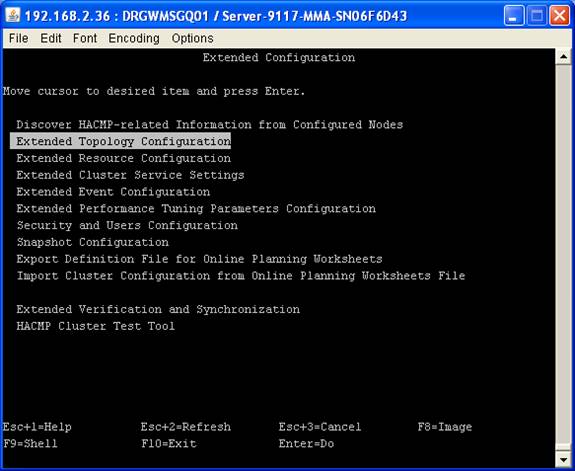
55. select show
HACMP Topology

56. select show cluster topology


57. select Extended
Verification and Syncronization

58. select automatically correct errors found
during verification as YES


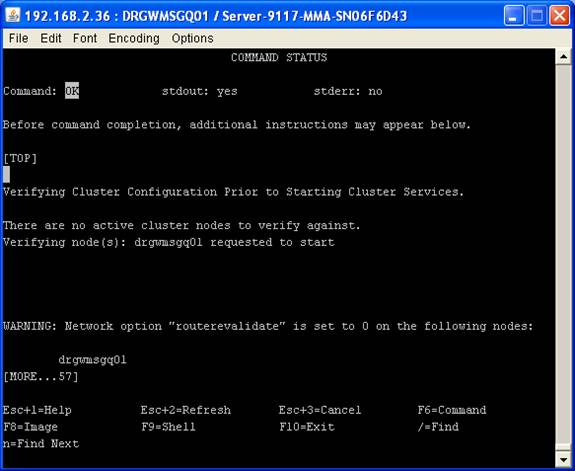
59. start the cluster on node1 using # smitty
clstart


60. HACMP Cluster
services started on Node 1
61. Check the service IP & Persistent IP
details using #ifconfig -a

62. start the
cluster services on node 2 using #smitty clstart

63. check the services IP & Persistent IP
details using # ifconfig-a on node2

64. check the cluster status using # lssrc –ls
clstrmgrES command

65. check the cluster
status using # lssrc –ls clstrmgrES command on node2

HACMP CONFIGURATION COMPLETED :-)
* Source Article from : Internet


